Position sizing and risk management for Bybit
Trade to a plan.
Every time.
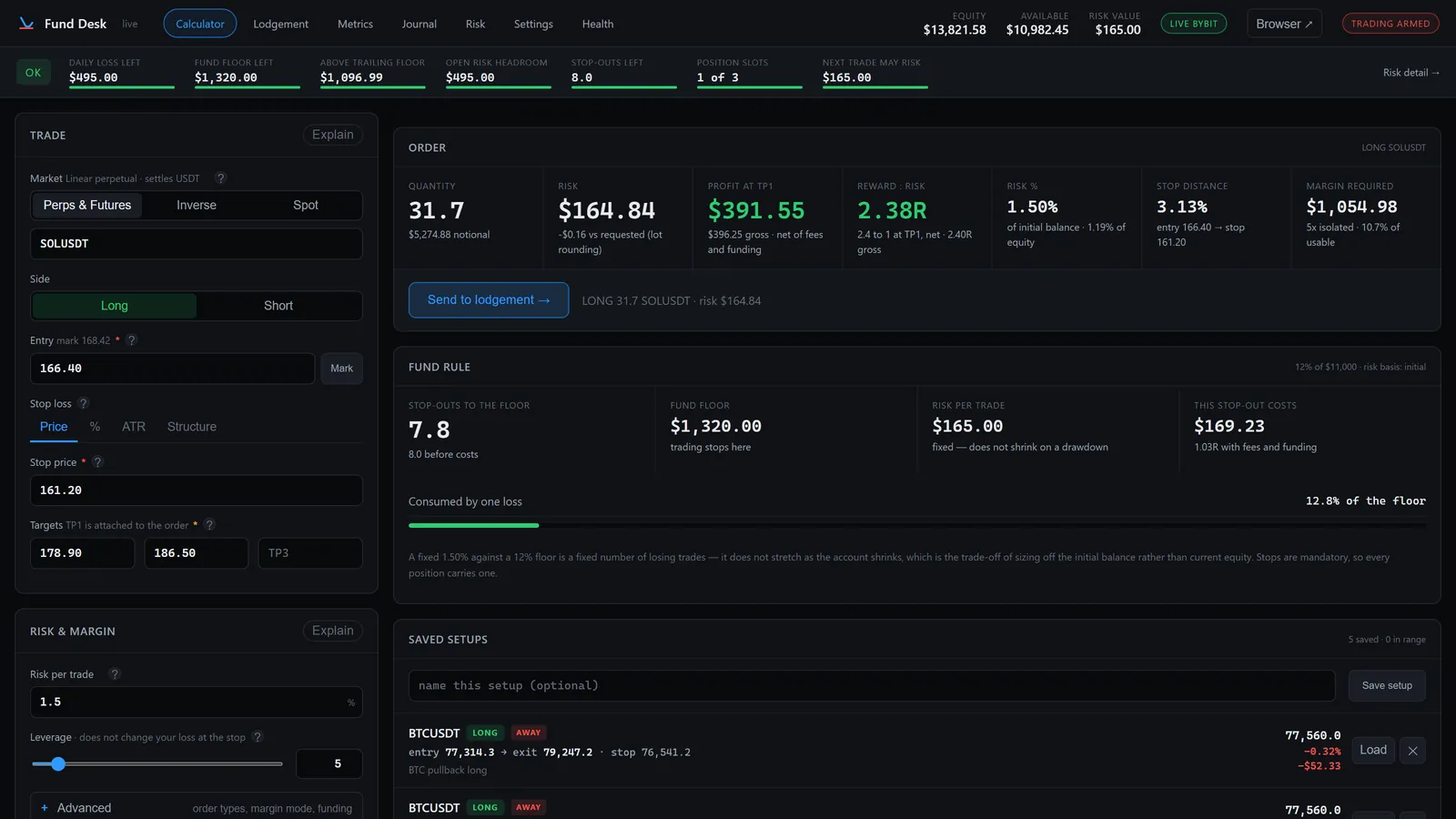
Set your limits once. Fund Desk sizes every trade to them — quantity, risk, margin, profit at target — and sends the order with the stop attached. Structure, without the spreadsheet.
No signals. No bot. No subscription.
Windows · runs on your machine · no account, no cloud

Why this exists
Your rules, in one place.
Applied to every trade.
Most traders have rules like these. Most keep them in their head, and a head at 11pm after three losses is not where a rule belongs.
Fund Desk holds them for you. Type an entry and a stop, and the trade comes out sized to your rules — the quantity, the risk in dollars, what is left of the day. No spreadsheet, no mental arithmetic, no guessing.
Set to suit you — every number is yours
- Risk 1.5% per trade.
- Stop for the day after three losses.
- Never breach the account floor.
- Three positions, not four.
- Don't size up after a loss.
Your numbers, not ours. Pick Careful, Balanced or Aggressive as a starting point and change anything, or set each rule yourself. Nothing is switched on until you say so.
Three and a half minutes
Watch a trade go through
Limits set, trade sized, order lodged with the stop at the exchange, then the journal and the numbers. The real software, start to finish.
Plays from YouTube when you press play. Nothing loads from YouTube until then.
How it works
Three steps. About twenty seconds.
-
01
Set your limits once
Pick Careful, Balanced or Aggressive, then adjust anything. About a minute.
-
02
Size the trade
Entry, stop, target. It returns the quantity, the risk and the profit.
-
03
Send it
One order to Bybit, stop attached. If it breaks a rule, it tells you which.
Funded and prop accounts
One trade can end a funded account. This is built for that.
Enter your firm's drawdown, daily limit and reset time once. Every trade is sized inside them, and the strip shows what is left — including a trailing drawdown that rises with your best equity.
How it handles funded accounts →Sending the order
Nothing goes out until you confirm it
You see the order, you type the symbol, it goes. The stop travels with it and lives at Bybit, not in software that can crash — and the desk checks it landed.

Plan vs. Actual
Did you follow the plan?
Every trade is recorded with the plan it came from — entry, stop, target, planned risk — so the journal can show what you did against what you meant to do. Plan followed, cut early, or held past the stop. Other journals only ever see the fill.

What you get
Three things, done properly.
Calculator
Entry, stop, target. It returns everything the trade costs and pays.
- Quantity, risk, margin, liquidation distance, fees
- Stops by price, percent, ATR or structure
- Perpetuals, inverse and spot, each sized correctly
Guardrails
Your limits, and what is left of each, on every page.
- Risk per trade, daily loss, fund floor
- Trailing drawdown for funded accounts
- Position cap and losing-streak cooldown
Journal
Every trade recorded with the plan it came from.
- Plan followed, cut early, or closed past the stop
- Win rate, expectancy, profit factor, R per period
- Equity curve, monthly matrix, CSV export
Also in the box: one-click close and stop to break-even, a metrics dashboard, daily backups, and a health page that says exactly where your data lives.

Exchanges
Built and tested on Bybit
More exchanges are coming. Your one payment covers them — updates are free, so whatever gets added, you already own it.
Platforms
Windows today. Mac is planned.
On a Mac? Tell us — the order things get built in follows who asks, and you will be told first when it ships.
Honesty
What it is not
Said plainly, so nobody buys the wrong thing.
Price
One payment. That is the whole pricing page.
No subscription, no tiers, nothing that expires. You are buying a program, the way software used to be sold. This is the launch price; anyone who buys at it keeps every update at no further cost.
- The full program — every feature on this page
- Free updates — including new exchanges as they land
- Keeps working whether or not we do
- A 14-day refund, no questions asked and no reason required
Questions
Worth asking first
Does it trade for me?
No. It sizes and checks the trade, then sends the order only when you press the button and type the symbol. There is no automatic mode. Without a trade key it cannot send anything at all.
Can you see my keys, my trades, or my balance?
No, and there is no mechanism by which we could. Your keys are encrypted on your own disk and your journal is a database in your own user folder. The program talks to Bybit, and once a day it downloads a short public list of revoked licence keys from funddesk.app — a plain file, sent nothing in return, and you can switch that off in Settings.
What happens if you go out of business?
Nothing changes. There is no licence server to shut down and no account to deactivate. Your key is checked offline, so your copy keeps working.
What does the licence key do?
It activates the desk. You enter it once during setup and Fund Desk runs; without a valid key it does not. Your positions and stops live at Bybit, not in the desk, so nothing about the key ever touches a trade. Verification is offline — nothing phones home.
I trade a funded / prop account. Does it handle that?
Yes — that is what the trailing drawdown rule is for. It tracks the floor from your high-water mark rather than your starting balance, which is the rule most people breach and the one that is easiest to misjudge while you are in profit. More on funded accounts →
Which exchange?
Bybit today — perpetuals, inverse contracts and spot. Binance, OKX and Bitget are being built, and your one payment covers them when they land.
Why not a subscription?
It runs on your computer and uses none of our resources. Charging monthly for that is rent. One payment also puts the incentives the right way round: we do not need you to keep trading.
What do I need to install?
Windows 10 or 11, and about 40MB of disk. The installer is 16MB and installs for your user only, so there is no administrator prompt. Nothing else to set up.
Does it run on a Mac?
Not yet. A Mac version is planned, not dated. If that is you, email [email protected] and say so — the order things get built in follows who asks, and you will be told first when it ships. Do not buy the Windows version hoping to run it another way.
Windows showed me a warning on first run. Is that normal?
Yes. Fund Desk is not code-signed yet, which is the usual state of independent Windows software. Choose More info, then Run anyway.
Is my money at risk from bugs in this?
Any software that can place an order carries that risk. What we can tell you is how it is built to fail: the stop is attached to the entry order and verified afterwards, only one module can place an order at all, it refuses to trade on stale data, and 478 automated tests run before every release. Read sections 4, 5 and 8 of the licence agreement before you buy.
Can I use it on more than one computer?
Yes. The licence is for you, not for a machine. Sharing your key with other people is what the agreement prohibits, and each key carries the email it was issued to.
How do I get my licence key?
Emailed automatically, usually within a few minutes. The download is on the receipt page immediately, so you can install while you wait.